
Set up your IBC relayer
To facilitate cross-chain DeFi integration within the Cosmos ecosystem, you must first establish a reliable IBC relayer. A relayer is an off-chain service that scans connected chains, builds proofs, and delivers messages between them, effectively acting as the bridge that allows blockchains to communicate 1. Without this component, the protocol remains dormant, preventing token transfers and atomic swaps between chains [2].
You can either run your own relayer or select a managed provider. Running your own instance gives you full control over security and uptime but requires significant technical overhead. Managed services simplify the process but introduce a trust dependency. For most developers aiming for robust cross-chain applications, the choice depends on your infrastructure capacity and risk tolerance.
1. Choose your relayer software
The standard implementation for Cosmos IBC is the Hermes relayer, developed by Iqlusion. It is written in Rust and designed for high performance and reliability. While other options exist, Hermes is the most widely adopted and well-documented tool for connecting Cosmos SDK chains. Ensure you select the version compatible with the IBC-Go version running on your target chains.
2. Configure chain endpoints
Edit your relayer configuration file to define the chains you wish to connect. You must provide the RPC and gRPC endpoints for both the source and destination chains. Accuracy is critical here; incorrect endpoints will cause the relayer to fail during the packet lifecycle. Verify that your nodes are fully synced and accessible from the server hosting your relayer.
3. Set up client keys and wallets
Generate or import wallet keys for the relayer on each connected chain. The relayer needs these keys to pay transaction fees and sign messages on behalf of the IBC clients. Securely store these keys, as they control the relayer's ability to operate. Most operators use environment variables or secure secret managers to keep private keys out of the configuration files.
4. Initialize and start the relayer
Run the initialization command to create the IBC clients, connections, and channels between the chains. Once initialized, start the relayer daemon. Monitor the logs for errors related to packet acknowledgment or timeout. A healthy relayer will continuously update client headers and relay packets as they arrive, maintaining the state synchronization between chains.

Download the latest Hermes binary from the official GitHub releases. Verify the checksum to ensure integrity. Install it to your system path so you can access the hermes command globally.
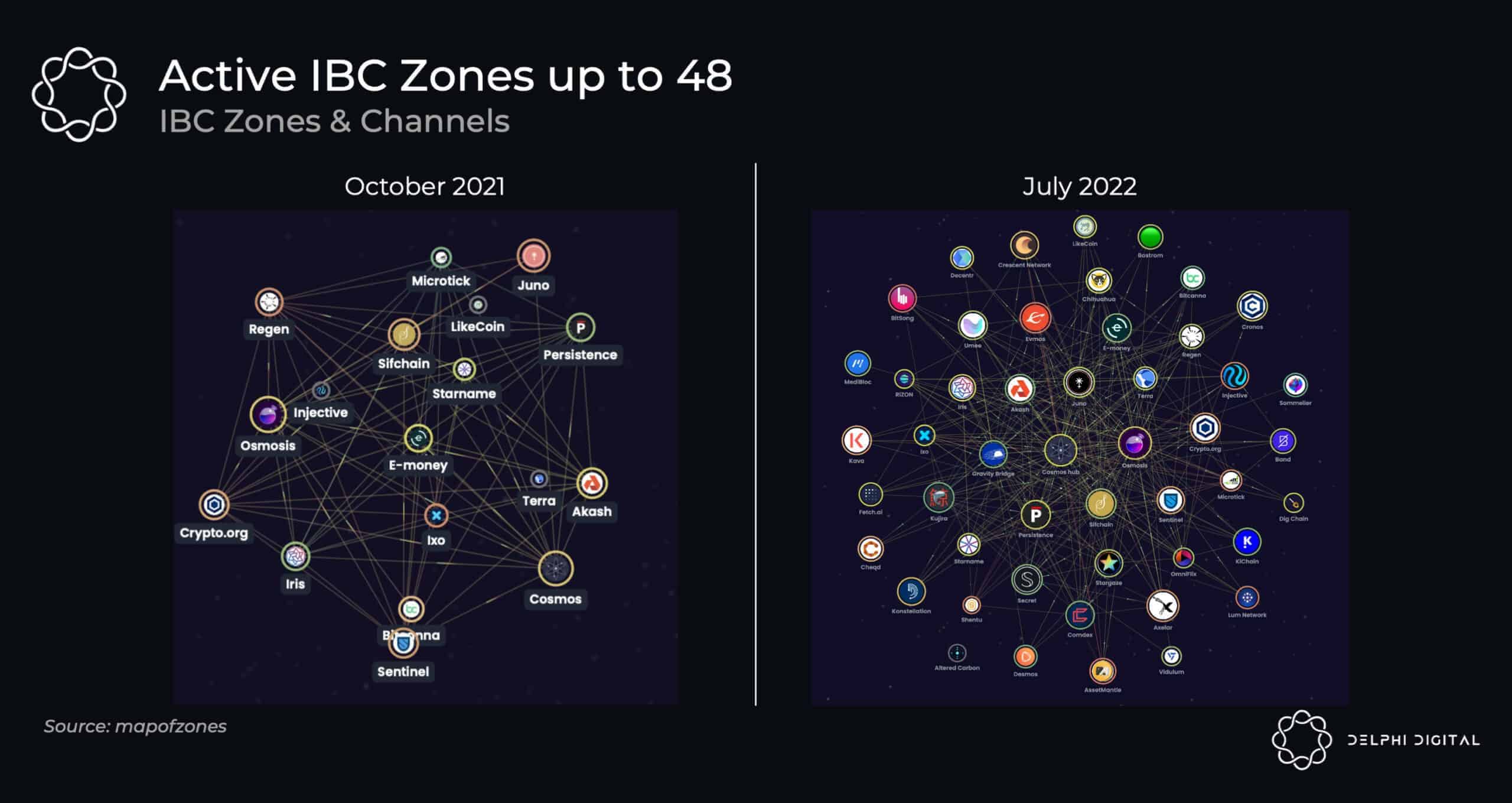
Create a config.toml file defining your source and destination chains. Add the RPC and gRPC URLs for each chain. Ensure the network IDs match the actual chain IDs to prevent connection errors.
Use hermes keys add to generate keys on each chain. Fund these addresses with the native gas token (e.g., ATOM) to cover transaction fees. Without gas, the relayer cannot submit packets or acknowledgments.
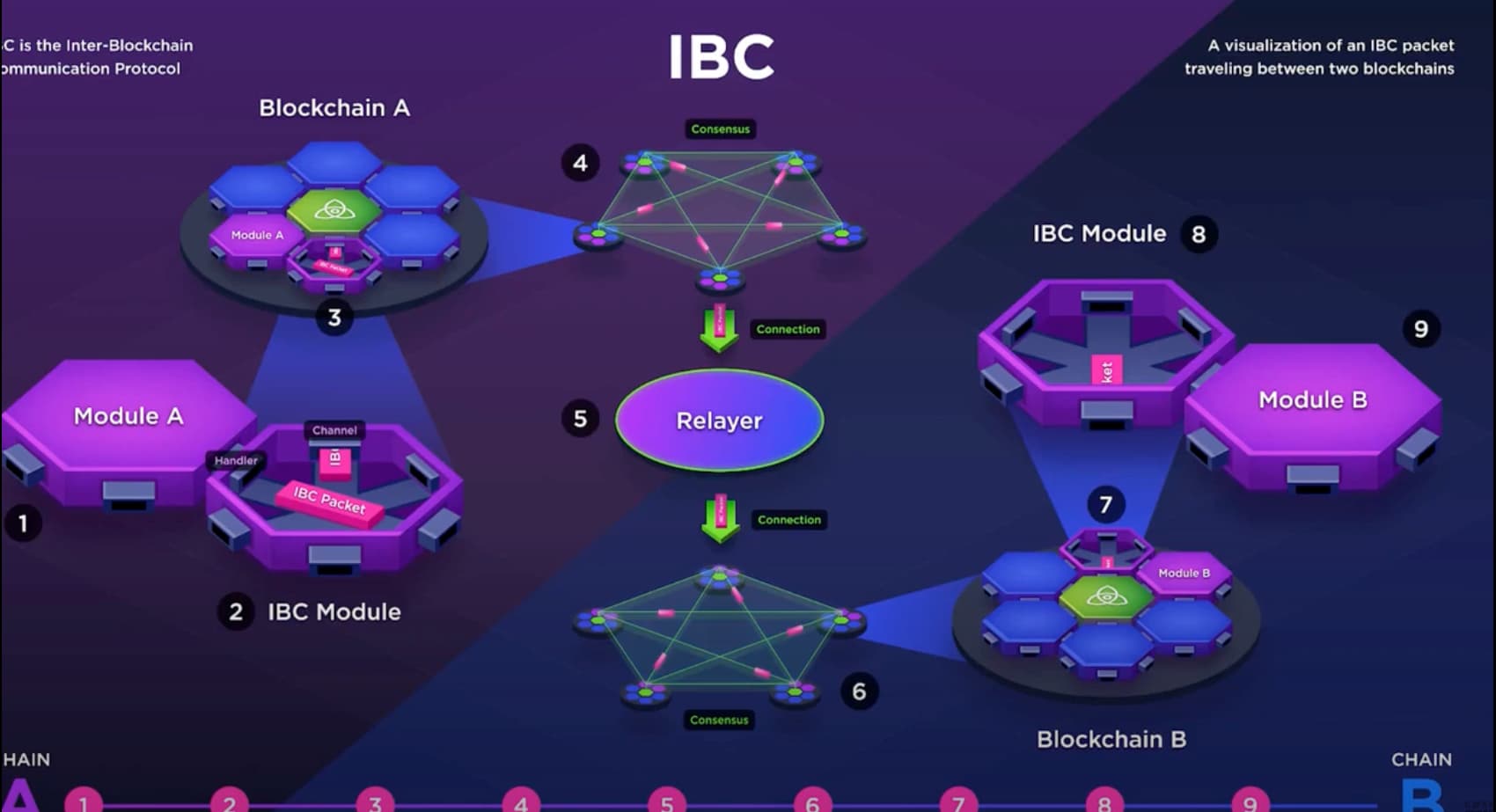
Run hermes create connection and hermes create channel to establish the IBC path. Verify the clients are updated by checking the latest header height. Start the relayer with hermes start to begin relaying packets.
Connect chains via IBC channels
Cross-chain DeFi integration begins with establishing a direct communication path between two Cosmos SDK chains. This is not a simple network bridge; it is a standardized protocol that ensures assets and data move securely without central custodians. The protocol acts as the underlying transport layer, allowing independent blockchains to exchange information and value atomically.
To enable this, you must configure the IBC modules on both the source and destination chains. These modules handle the verification of state transitions, ensuring that a transfer initiated on one chain is correctly reflected on the other. Once the software is prepared, the next phase involves setting up the channel infrastructure. This process creates a dedicated "channel" between two specific ports on each chain, defining the rules for how packets of data and tokens are serialized and validated.
The actual connection relies on relayers—off-chain services that monitor both chains and submit proofs of state changes. When a user initiates a token transfer, the source chain locks the assets and emits an event. A relayer picks up this event, proves the lock to the destination chain, and triggers the release of equivalent assets on the other side. This mechanism ensures that the total supply of tokens remains constant across the ecosystem, preventing double-spending or inflation during cross-chain movement.
For a visual breakdown of how packets flow through this system, refer to the official IBC-Go documentation for detailed architecture diagrams. Understanding this packet flow is essential for debugging connection issues and optimizing transfer latency.
Enable the ibc module in your chain’s configuration. This activates the necessary ports and handlers for receiving and sending packets. Ensure the module is correctly linked to your app’s module manager before starting the node.
Create a light client on the destination chain that tracks the source chain’s consensus state. This client allows the destination chain to verify proofs submitted by relayers, confirming that events on the source chain are genuine.
Initiate a channel opening sequence between the two chains. This involves exchanging connection identifiers and channel ports. The handshake ensures both sides agree on the channel version and ordering guarantees before any data can flow.
Launch relayer nodes that monitor both chains for new IBC events. These relayers must be funded with native gas tokens on both chains to pay for transaction fees. Properly configured relayers are critical for keeping the channel active and assets transferable.
Transfer assets across ecosystems
Moving tokens like ATOM or USDC between Cosmos chains and external networks relies on the protocol. IBC acts as a standardized messaging layer, allowing independent blockchains to exchange data and value without a centralized intermediary. In 2026, this protocol connects over 200 public networks, enabling seamless liquidity flow across the interchain ecosystem.
To execute a transfer, you must use a wallet that supports IBC-native routing. Popular options like Keplr, Leap, or Cosmos Station allow you to select source and destination chains directly within the interface. These wallets handle the complex proof verification and packet forwarding required by IBC, presenting the process as a simple "Send" action to the user.
When initiating a transfer, pay close attention to the network fees and transfer time. Each hop in the transfer path incurs a small gas fee, and the total time depends on the consensus speed of the destination chain. For high-value transfers, verify the liquidity pools on the receiving chain to ensure your assets can be utilized immediately upon arrival.
Open your IBC-compatible wallet and navigate to the "Transfer" or "Send" feature. Select your source chain (e.g., Cosmos Hub) and the destination chain (e.g., Osmosis or a Cosmos SDK-based app). Ensure your wallet is connected and synced with the latest chain state.
Input the recipient's address on the destination chain. Enter the amount of tokens you wish to transfer. The interface will typically display an estimated transfer time and total fees in the native token of the source chain. Double-check the destination address, as IBC transfers are irreversible.
Review the transfer details, including the gas fee and the receiving chain. Confirm the transaction in your wallet. The IBC packet will be submitted to the source chain, and the relayers will handle the cross-chain messaging. You can track the status in your wallet or via a block explorer.
Once the transfer is complete, check your balance on the destination chain. The tokens will appear in your wallet once the IBC packet is verified and processed. If using a non-native IBC token, you may need to bridge it to a standard ERC-20 or IBC-denom representation depending on the chain's architecture.
Compare relayer providers
Choosing a relayer means balancing cost, control, and maintenance. You can self-host to retain full visibility or use a third-party service for managed uptime. The right choice depends on your technical comfort and tolerance for operational overhead.
Self-hosted relayers offer complete control over your infrastructure and data. However, they require you to manage server health, updates, and network connectivity. Third-party providers handle these tasks, often offering higher reliability at a monthly subscription cost.
Use the comparison below to evaluate your options based on key operational metrics.
Verify security and audits
Cross-chain transactions move assets across distinct security perimeters. A vulnerability in one chain’s IBC application or relayer infrastructure can compromise funds on connected chains. Before integrating any cross-chain DeFi protocol, you must independently verify the security posture of every component in the transport layer.
Start by auditing the IBC app smart contracts. Look for recent, comprehensive audits from reputable firms like CertiK, OpenZeppelin, or Trail of Bits. Prioritize projects that have published their audit reports and, crucially, have addressed all critical findings. Do not rely solely on the project’s own claims of being "IBC-enabled."
Next, evaluate the relayer infrastructure. Relayers are the messengers that deliver packets between chains. If a relayer is compromised or misconfigured, it can lead to stuck packets or, in worst-case scenarios, double-spends. Prefer solutions that use multiple, independent relayer operators rather than a single point of failure. The Cosmos documentation emphasizes that IBC is a secure transport mechanism, but its security depends on the correctness of the applications built on top of it 1.
Finally, check the governance and upgrade mechanisms. Can the contract be upgraded maliciously? Is there a timelock? Secure IBC integrations typically have transparent governance processes and conservative upgrade paths. Treat every cross-chain connection as a potential attack vector until proven otherwise.
Plan your multi-chain strategy
Before executing any cross-chain transfers, verify your setup to prevent lost assets. A disciplined workflow protects your capital more effectively than speed.
-
Verify the receiving chain is active and compatible with your IBC channel
-
Confirm the token is whitelisted on the destination hub
-
Check gas fees on both source and destination chains
-
Ensure your wallet supports the specific IBC version (e.g., IBC 2.0)
Common questions about Cosmos IBC
The Cosmos ecosystem is shifting from isolated blockchains to a unified interchain network. Below are direct answers to the most common questions about the future, utility, and economics of the Cosmos Internet of Blockchains.
No comments yet. Be the first to share your thoughts!