
Set up your Cosmos SDK environment
To build for the 2026 Cosmos ecosystem, you need a development environment that matches the current stable releases of the Cosmos SDK and IBC-Go. This setup ensures your binary is compatible with the latest Inter-Blockchain Communication (IBC) standards and security patches.
Start by installing Go. You need version 1.22 or later. The Cosmos SDK relies on Go modules for dependency management, so a clean Go path is essential. Verify your installation with go version before proceeding.
Next, clone the IBC-Go repository. This repo contains the core protocol logic for cross-chain transfers. Clone the latest release tag to ensure you are working with a stable, audited version of the protocol. This serves as the foundation for your chain's IBC capabilities.
With Go and IBC-Go installed, you are ready to scaffold your chain. Use the cosmos CLI or ignite to generate a new project, pointing to your local IBC-Go module. This step binds your chain's codebase to the correct IBC version, ensuring seamless cross-chain communication from day one.

Configure IBC middleware for your chain
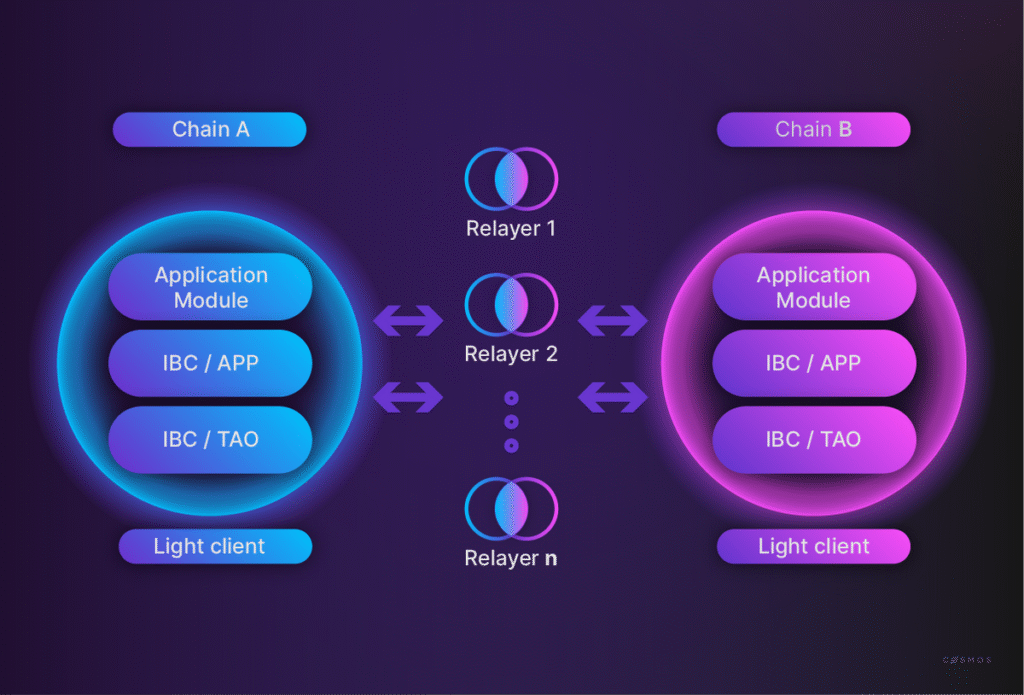
To enable standard-compliant communication between independent blockchains, you must integrate IBC middleware into your Cosmos SDK application. This middleware acts as the bridge, allowing your chain to interpret and relay IBC packets to connected networks. The process involves defining the channel structure, setting up the necessary light clients for verification, and registering the middleware hooks that handle packet lifecycle events.
Start by specifying the port ID and channel version in your chain’s app.go or module configuration. The port ID identifies the application binding (e.g., transfer for token transfers), while the channel version defines the protocol version. Ensure your chain listens on the correct port before attempting to open a channel with a counterparty chain.
IBC relies on light clients to verify the state of remote chains. Add the specific light client implementations for the chains you intend to connect to your application’s keeper. For example, if connecting to Osmosis, include the Tendermint light client module. This allows your chain to trustlessly validate headers and packet acknowledgments from the counterparty.
Implement the ChanOpenInit, ChanOpenTry, ChanOpenAck, and ChanOpenConfirm callbacks in your middleware. These hooks intercept channel opening sequences, allowing you to enforce custom logic such as access control or data validation before the channel becomes active. Register these hooks in your module’s BeginBlocker or initialization routine to ensure they are active when packets arrive.
Deploy your configured chain alongside a test counterparty chain using Docker or a local Cosmos SDK testnet. Use the interchain-cli or similar tooling to initiate a channel opening sequence. Verify that packets are successfully relayed and that your middleware hooks execute as expected by inspecting the chain logs for packet acknowledgment events.
Once configured, your chain will be part of the Inter-Blockchain Communication ecosystem, capable of sending and receiving any byte-encoded data. This setup is the foundation for building complex cross-chain applications, from atomic swaps to multi-chain smart contracts.
Execute atomic token swaps across chains
Cosmos IBC enables atomic token swaps across chains by leveraging a light client verification system. Unlike centralized bridges that lock assets in a custodial wallet, IBC ensures that tokens are minted on the destination chain only after the source chain has locked them, and vice versa. This atomicity means the transaction either completes fully on both sides or reverts entirely, eliminating the risk of partial failures or loss of funds.
1. Configure the relayer and client
Before executing a swap, you must establish a light client connection between the two chains. The relayer software monitors headers from both chains to verify their validity. This step is critical because the IBC protocol relies on these light clients to trust the state of the counterparty chain. Without an active client, the chains cannot verify proofs of transactions, making any cross-chain communication impossible.
2. Initiate the transfer from the source chain
To start the swap, send a transaction on the source chain (e.g., Cosmos Hub) using the cosmoscli or a compatible wallet interface. Specify the destination chain ID (e.g., Osmosis) and the recipient address. The transaction includes a memo field that can carry additional data or instructions for the receiving chain. The source chain locks the specified tokens in the IBC escrow account and emits an event signaling the transfer.
cosmoscli tx bank send \
  <from_address> \
  <destination_address> \
  100uatom \
  --chain-id cosmoshub-4 \
  --fees 500uatom \
  --yes
3. Relayer processes the packet
Once the transaction is committed, the relayer detects the new packet in the source chain's IBC module. It then generates a proof of the packet's inclusion and submits this proof to the destination chain's light client. The relayer acts as a messenger, ensuring that the state change is verified and applied on the other side. This process is automated and typically completes within seconds to minutes, depending on network congestion.
4. Verify receipt on the destination chain
After the relayer submits the proof, the destination chain verifies the light client proof against its stored header. If the proof is valid, the IBC module unlocks the escrowed tokens (or mints new ones if they are native to the source chain) and credits the recipient's account. You can verify the completion by checking the transaction hash on the destination chain's explorer or by querying the balance directly.
cosmoscli query bank balances <recipient_address> \
  --chain-id osmosis-1
This atomic swap process ensures that your assets move securely between chains without exposing them to the risks associated with centralized intermediaries. The entire flow is deterministic and verifiable, providing a robust foundation for cross-chain liquidity.
Verify light client proofs for security
Cross-chain transfers rely on the receiving chain trusting the sending chain's state. IBC achieves this without a centralized validator set by using light clients. A light client is a smart contract on the destination chain that tracks the header chain of the source chain. It verifies that the data you are receiving is part of the canonical history of the source chain.
For 2026 implementations, security depends on the integrity of this verification. The receiving chain must validate the proof against the light client's stored state. If the proof does not match the expected root hash, the transfer is rejected. This mechanism ensures that funds are only released when the source chain has definitively recorded the transaction.
You can verify this process by inspecting the VerifyClientMessage function in the light client module. This function checks the consensus state against the trusted header. It also validates the proof of membership for the specific packet or channel update. If any step fails, the module halts execution.
When debugging, check the error logs for invalid proof or height mismatch. These errors usually indicate that the light client is out of sync with the source chain's current state. Updating the light client to the latest height resolves most verification issues.
Pre-Deployment Checklist for IBC-Enabled Apps
Before sending your application to mainnet, verify that your IBC implementation handles edge cases correctly. Cross-chain transfers involve multiple moving parts—light clients, relayers, and channel states—that must align perfectly.
Use this checklist to ensure your deployment is robust and ready for production traffic.
Channel Opening and State Verification
Confirm that the IBC channel is in the OPEN state on both source and destination chains. A channel in TRYOPEN or OPEN but not fully acknowledged will drop packets silently. Use query channel commands to inspect the current state and ensure both sides have agreed on the ordering and version parameters.
Middleware and Fee Middleware Testing
If you are using middleware (like IBC-Packet Forwarding) or fee middleware, test the full packet lifecycle. Ensure that fees are correctly deducted and forwarded, and that the middleware hooks do not inadvertently block valid transfers. Verify that the OnRecvPacket and OnAcknowledgementPacket hooks execute as expected without panicking.
Light Client Sync and Relayer Health
Ensure the light client tracking the counterparty chain is synced. A desynced light client will fail to verify proofs, causing transfers to hang. Check the relayer's latest block height against the counterparty chain's current height. If the relayer is lagging, the IBC path is effectively broken until the relayer catches up.
Timeout and Error Handling
Test timeout scenarios. Send a packet with a tight timeout and verify that the counterparty chain correctly refunds the tokens and updates the escrow account. Proper error handling ensures that funds are never locked in escrow indefinitely due to network delays or relayer failures.
Frequently asked questions about IBC
What is IBC in Cosmos?
The Inter-Blockchain Communication (IBC) protocol enables separate blockchains to exchange tokens and data directly, without centralized intermediaries. Chains that support IBC can share any data encoded in bytes, allowing for complex cross-chain interactions like atomic swaps and multi-chain smart contracts.
Is Cosmos or Polkadot better for cross-chain transfers?
The choice depends on your architecture. Cosmos uses IBC for interoperability, allowing independent blockchains to connect via light clients. Polkadot uses Cross-Chain Message Passing (XCMP) to enable secure interaction between parachains within a shared security model. Cosmos offers more sovereignty for individual chains, while Polkadot provides shared security.
Do I need a centralized exchange to transfer tokens via IBC?
No. IBC is a trustless protocol that allows direct peer-to-peer transfers between connected chains. You do not need to deposit funds into a centralized exchange; the transfer happens on-chain through relayers who facilitate message passing between the source and destination chains.
No comments yet. Be the first to share your thoughts!