
Verify your chain supports IBC-Go
Before initiating any cross-chain workflow, confirm that both your source and destination chains are running a supported version of IBC-Go. The Inter-Blockchain Communication protocol relies on specific middleware implementations to ensure packet security and atomicity. If either chain is running an outdated version or a legacy fork without active maintenance, your integration will fail or leave funds vulnerable.
The Cosmos ecosystem has shifted its development focus away from the older ibc-apps repository. That repository has been archived as of August 2026, meaning it no longer receives security patches or feature updates. Relying on legacy middleware from that era can introduce compatibility issues with current IBC-Go versions used by major networks like Cosmos Hub, Osmosis, or Celestia.
Note: The legacy
ibc-appsrepository is archived as of August 2026. Use the latest IBC-Go documentation for current middleware standards.
Instead, consult the official IBC-Go documentation to verify the specific version requirements for your target chains. Look for the ibc-go module version in the chain's go.mod file or check the chain's release notes for IBC compatibility statements. Ensure your nodes are synchronized with the latest mainnet state before attempting to configure light clients or relayers. This verification step is critical to avoid misconfigured connections that could result in stalled packets or lost assets.
Once you have confirmed IBC-Go compatibility, you can proceed to configure the light clients and relayers for your specific chain pair. Double-check the chain IDs and RPC endpoints to ensure they match the active mainnet or testnet you intend to use.
Select a reliable IBC relayer provider
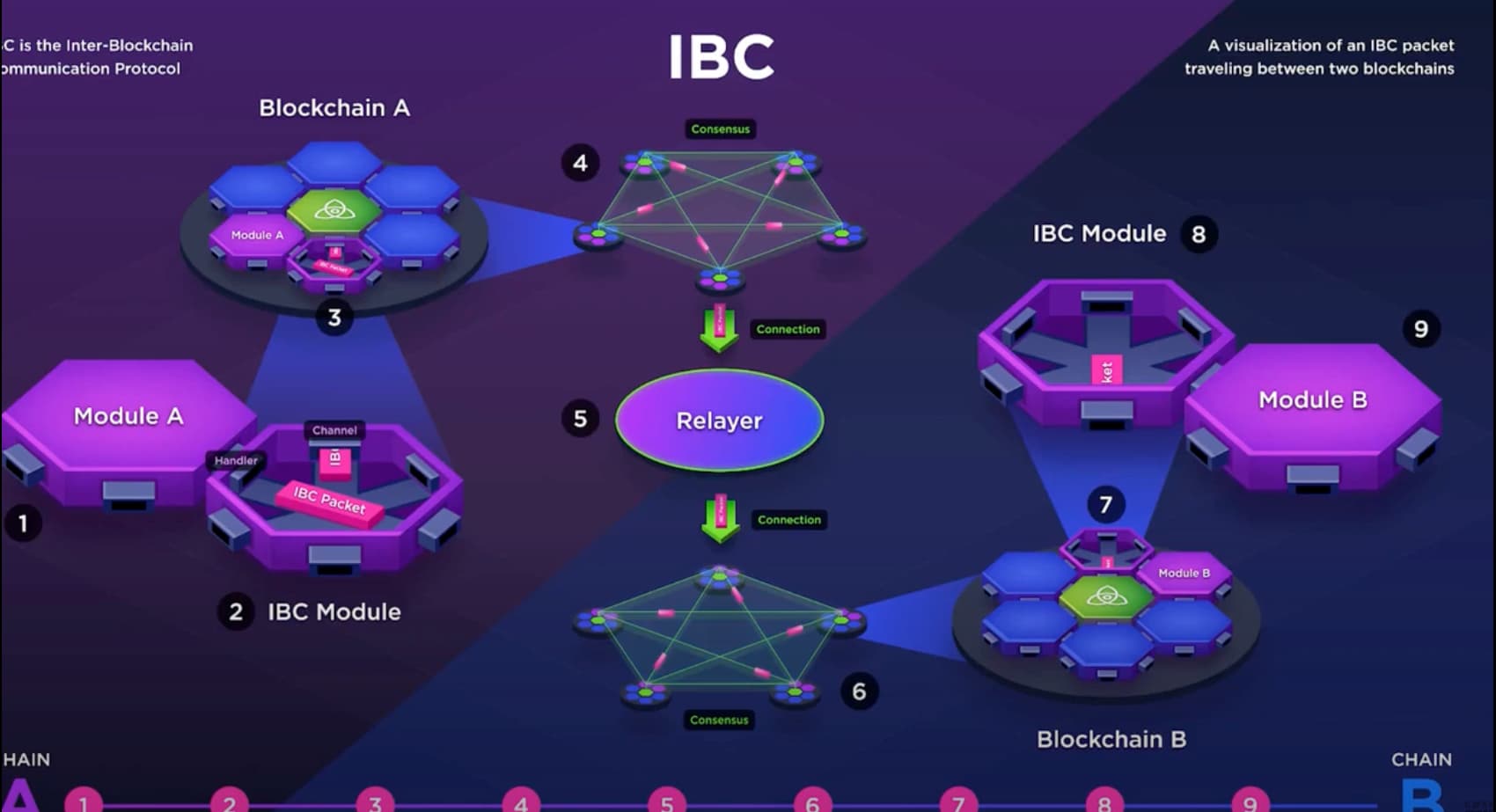
Choosing a relayer is the most critical infrastructure decision for your interchain integration. A relayer is an off-chain service that scans connected chains, builds packets, and submits proofs to ensure messages cross between networks. If your relayer goes down, your assets are stuck. You need a provider that guarantees high uptime and handles packet forwarding without manual intervention.
You generally have two paths: self-hosting or using a managed service. Self-hosting gives you full control but requires significant DevOps overhead to monitor node health and handle key management. Managed services abstract this complexity, offering SLAs and dashboards, but they introduce a trust assumption regarding their infrastructure. For most teams, the reliability of a managed provider outweighs the cost savings of running your own nodes.
To help you decide, compare the operational trade-offs between these two approaches.
| Feature | Self-Hosted | Managed Service |
|---|---|---|
| Uptime Guarantee | Depends on your ops | SLA-backed (99.9%+), |
| Setup Complexity | High (CLI, configs) | Low (Dashboard), |
| Cost | Low (Server costs), | |
| Security | You hold keys | Shared custody, |
When evaluating providers, prioritize those with transparent incident histories and clear key management policies. Avoid services that obscure their infrastructure or lack clear support channels. A reliable relayer is the backbone of your IBC integration; treat it as a critical utility, not an afterthought.
Establish the client and connection
Before any packets can flow, the two chains must mutually verify each other’s state. This trust is established through a light client on each side, which tracks the header and consensus of the counterparty chain. Once the light clients are installed, a transport channel is opened, and a connection handshake finalizes the link.
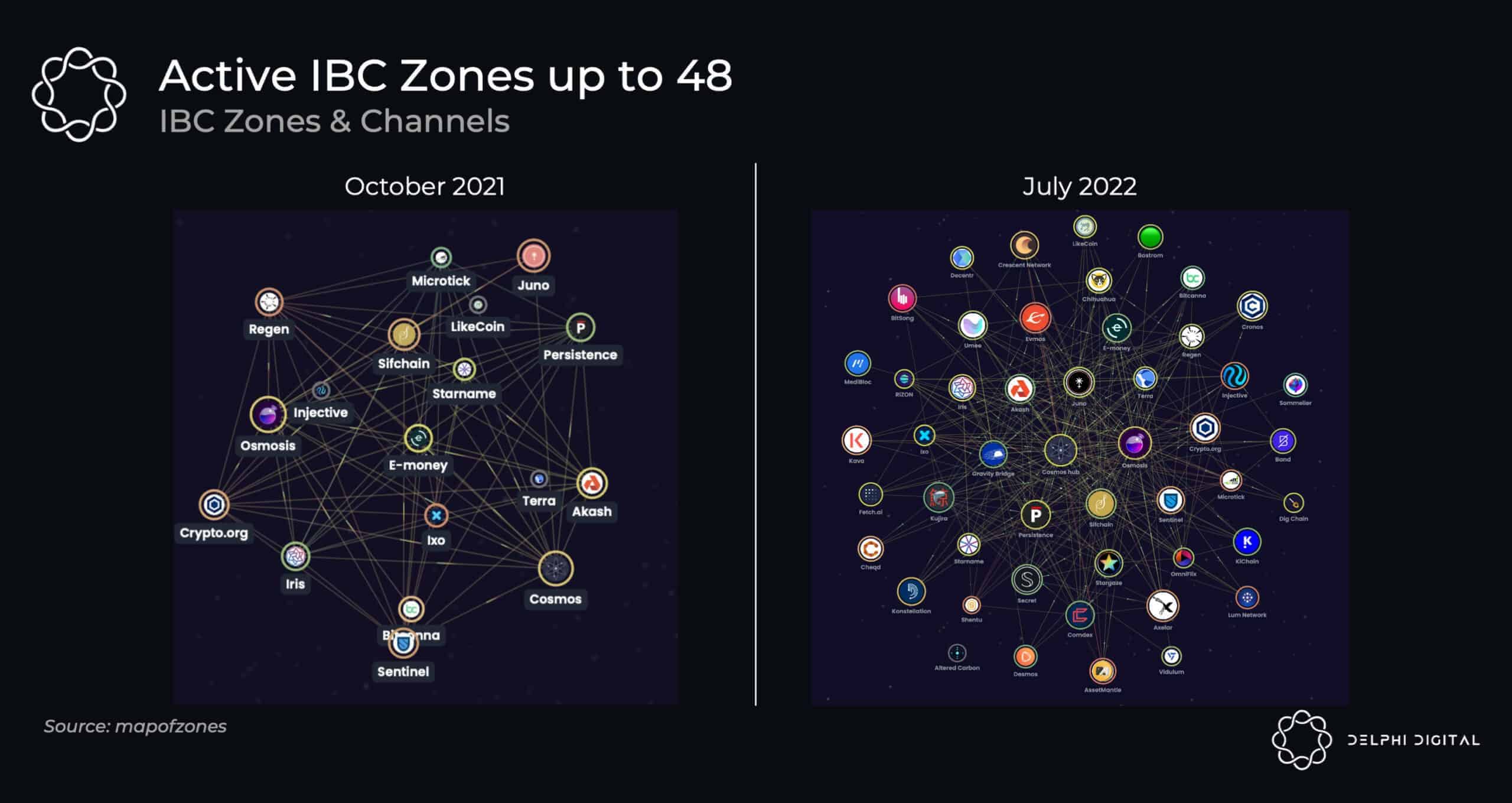
Each chain must run the IBC light client module for the counterparty. This module allows your chain to verify proofs generated by the other side without trusting a central validator set. You will need the counterparty chain’s initial height and genesis hash to configure the client correctly.
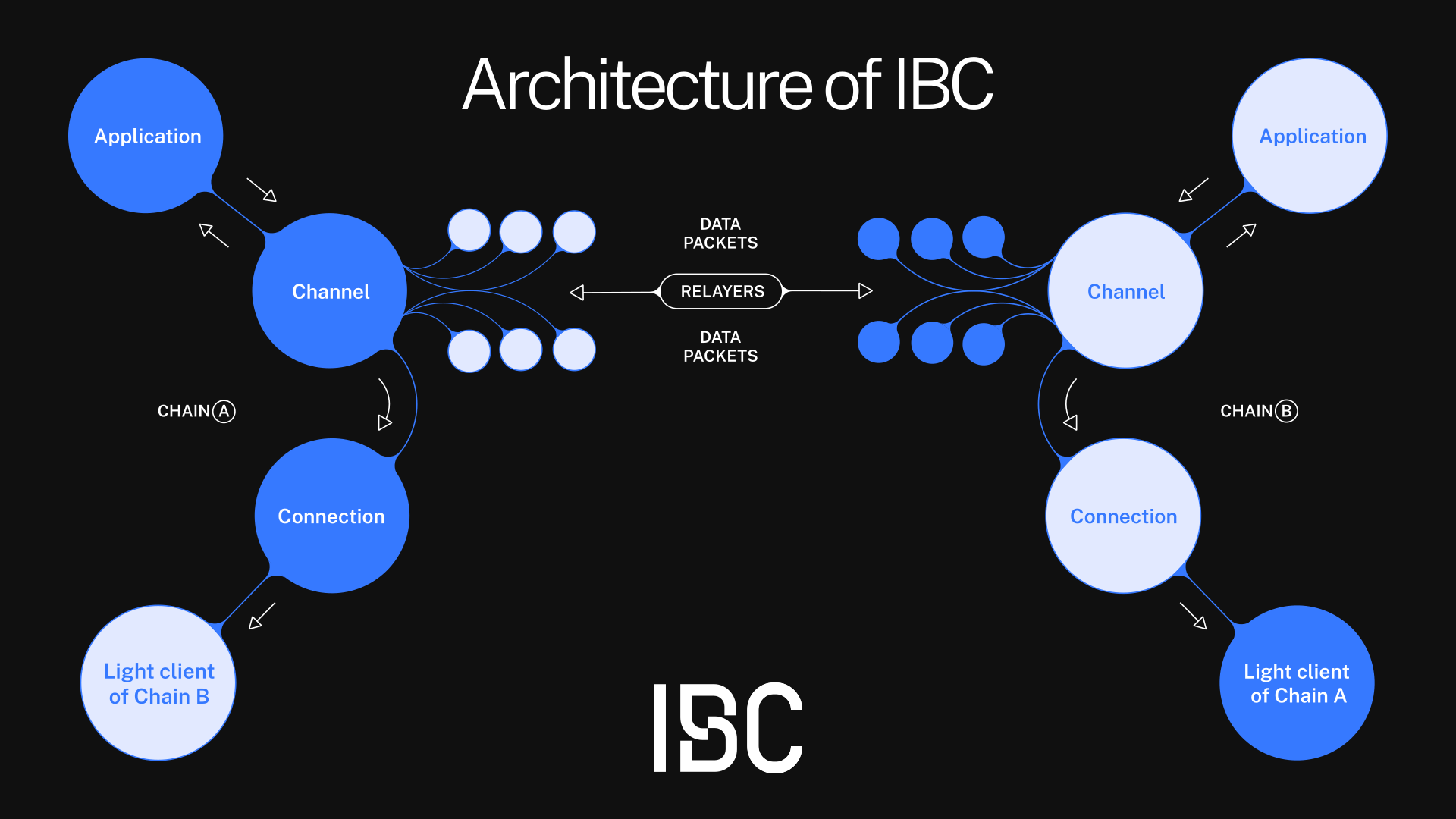
The handshake begins with an OPENINIT state, where one chain proposes a connection. The counterparty chain then moves to TRYOPEN to verify the proposal. Finally, both chains reach OPEN, confirming that the connection is established and ready to carry packets.
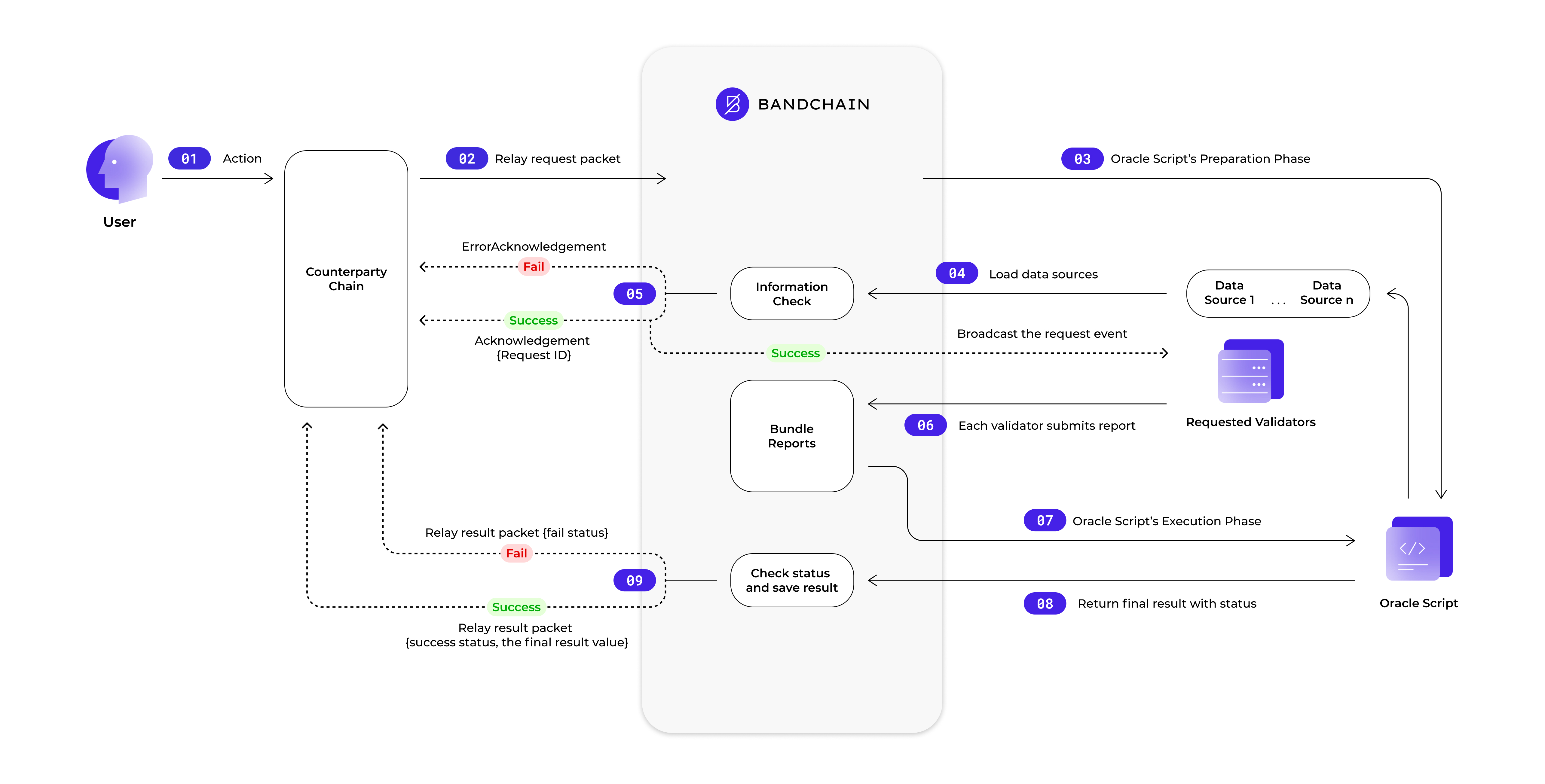
With the connection open, the light client continuously verifies new headers from the counterparty. When a packet is sent, the receiving chain uses the light client to verify the Merkle proof included in the packet. This ensures that the data originates from the valid state of the sending chain.
Execute the token transfer
With the IBC channel established and verified, you are ready to move assets between chains. This step uses the Interchain Token Transfer (ITT) standard, which allows a single transaction to handle the token movement and any associated metadata across the connected zones. Unlike older bridge methods that rely on centralized custodians, this process is trustless and atomic: either the transfer completes on both sides, or it fails completely, leaving funds safe in the source chain.
Before initiating the transfer, ensure your wallet is connected to the source chain and holds enough native tokens to cover the transaction fees. The destination chain requires a separate gas payment, which is often handled automatically by the ITT router, but verifying your balance prevents execution failures.
-
Verify source chain gas balance
-
Confirm destination address and chain ID
-
Check active IBC channel status
1. Initiate the transfer on the source chain
Navigate to your wallet interface and select the token you wish to transfer. Choose the "Interchain Token Transfer" or "IBC Transfer" option rather than a standard send function. Enter the destination chain ID and the recipient address on the target chain. The interface should display the estimated arrival time and any fees deducted from the principal amount.
2. Review the transaction details
Carefully review the proposed transaction. Confirm that the source chain, destination chain, and token denom are correct. The ITT protocol requires precise matching of these parameters; a mismatch will result in a failed transaction with no recovery mechanism. Once satisfied, sign the transaction with your private key.
3. Confirm the transfer on the destination chain
After the source chain block confirms the transaction, the packet is relayed to the destination chain. This typically takes a few minutes, depending on the channel's latency. You will need to sign a final confirmation transaction on the destination chain to claim the tokens. Once confirmed, the assets will appear in your destination wallet, completing the cross-chain bridge.
Note: Always verify the channel status on both chains before transferring large amounts. Use the official Cosmos IBC explorer to ensure the channel is active and not undergoing maintenance.
Common IBC transfer pitfalls
Interchain transfers are not magic; they are asynchronous processes mediated by relayers. When a packet fails, it usually stems from infrastructure friction, not protocol failure. Understanding these points of failure helps you troubleshoot effectively.
Packet loss due to relayer inactivity
The most common cause of stalled transfers is an inactive relayer. IBC packets require off-chain relayers to observe events on the source chain and submit proofs to the destination. If the relayer node goes offline, runs out of gas, or loses connectivity, the packet sits in the IBC escrow queue.
Check the relayer status using relayer paths status. If the packet is stuck, restarting the relayer or increasing the gas limit often resolves the issue. Ensure the relayer has sufficient funds on both chains to cover transaction fees.
Timeouts and refund failures
IBC transfers have a timeout window. If the packet is not relayed within this timeframe, it times out. The protocol should automatically refund the tokens to the original sender. However, if the relayer fails to submit the timeout transaction, the tokens remain locked in the IBC module.
Monitor the packet status via the IBC transaction hash. If a timeout occurs but the refund does not appear, the relayer may need to manually submit the timeout proof. This is a known edge case in high-latency environments.
Memo field errors
Sending tokens with an invalid or unsupported memo field can cause the receiving chain to reject the packet. Many chains require specific memo formats for IBC transfers, especially when interacting with decentralized exchanges or liquidity pools.
Always verify the memo format required by the destination chain. Use official Cosmos documentation to confirm supported memo structures. An incorrect memo can result in the packet being dropped or the tokens becoming inaccessible.
No comments yet. Be the first to share your thoughts!