
Set up the IBC relayer
To enable interchain connectivity, you must install and configure a relayer. In 2026, the standard has shifted from manual packet forwarding to automated relaying, which ensures that state proofs and packets are consistently moved between chains without human intervention.
Note: The legacy
ibc-appsrepository is archived as of 2026. Use active middleware like IBC-Go or specific app modules instead.
1. Install the relayer software
The most widely adopted tool for connecting Cosmos SDK chains is the hermes relayer, developed by Confio Labs. It is written in Rust and provides a robust CLI for managing channels and clients.
Install Hermes using cargo or download the pre-compiled binary from the official GitHub releases page. Verify the installation by running hermes version in your terminal.
# Install via cargo
cargo install hermes

# Verify installation
hermes version
2. Configure your chains
Create a configuration file, typically named config.toml, in your .hermes directory. This file defines the chains you want to connect. You will need the chain IDs, RPC endpoints, and key names for both sides of the connection.
[[chains]]
id = 'cosmoshub-4'
type = 'CosmosSdk'
rpc_addr = 'http://localhost:26557'
grpc_addr = 'http://localhost:9090'

[[chains]]
id = 'osmosis-1'
type = 'CosmosSdk'
rpc_addr = 'http://localhost:26657'
grpc_addr = 'http://localhost:9091'
Ensure your key_name matches the key stored in your local keyring. You can list available keys using hermes keys list --chain <chain_id>.
3. Create clients and open channels
With the configuration in place, you can establish the connection. The relayer will create light clients for each chain, allowing them to verify state proofs.
Run the following command to automatically create clients, open a channel, and start the relayer:
hermes create connection --from-chain cosmoshub-4 --to-chain osmosis-1
This process involves several steps: creating the clients, creating the connection, and opening the channel. Once complete, the relayer will begin forwarding packets automatically.
4. Verify the connection
Check the status of your channels to ensure they are open and the relayer is running.
hermes channels
If the channel status is Open, your IBC relayer is successfully configured and active. You can now proceed to test token transfers between the chains.
Establish client and connection
Before assets can move between Cosmos Hub and Osmosis, the chains must recognize each other. This requires three sequential steps: creating a light client, establishing a connection, and opening a channel. The Inter-Blockchain Communication (IBC) relayer handles the heavy lifting by scanning both chains and submitting the necessary proofs.
1. Create the light client
A light client allows one chain to verify the header of another without downloading the entire blockchain. Run the following command to create a client on the source chain (e.g., Cosmos Hub) targeting the destination chain (e.g., Osmosis). Replace osmosis-1 with your destination chain ID.
# Create a light client for the destination chain
ibc create client \
  --source-chain cosmoshub-4 \
  --target-chain osmosis-1 \
  --home ~/.relayer \
  -y
This command generates a client ID, typically formatted as 07-tendermint-<number>. This ID is critical for the next step.
2. Establish the connection
With the client active, you can now open a connection. This step sets up the IBC path but does not yet allow data transfer. Use the client ID generated in the previous step.
# Establish a connection between the two chains
ibc create connection \
  --src-chain cosmoshub-4 \
  --dst-chain osmosis-1 \
  --src-client 07-tendermint-0 \
  --home ~/.relayer \
  -y
The output will provide a connection ID (e.g., connection-0). This identifier links the two chains at the transport layer.
3. Open the channel
Finally, open a channel to enable actual data and token transfer. Specify the connection ID and the port IDs (usually transfer for tokens). This command finalizes the setup, allowing you to send IBC transfers.
# Open a channel for token transfers
ibc create channel \
  --src-chain cosmoshub-4 \
  --dst-chain osmosis-1 \
  --src-port transfer \
  --dst-port transfer \
  --connection connection-0 \
  --home ~/.relayer \
  -y
Once the channel ID is returned, your interchain connectivity is live. You can now verify the setup by sending a test transaction between the two networks.
Test cross-chain token transfers
Now that your relayer is running and channels are open, verify the setup by moving tokens between chains. This step confirms that the light clients are syncing and the relayer is correctly packet-forwarding. Unlike centralized bridges that hold your assets in custody, IBC transfers are trust-minimized and peer-to-peer.
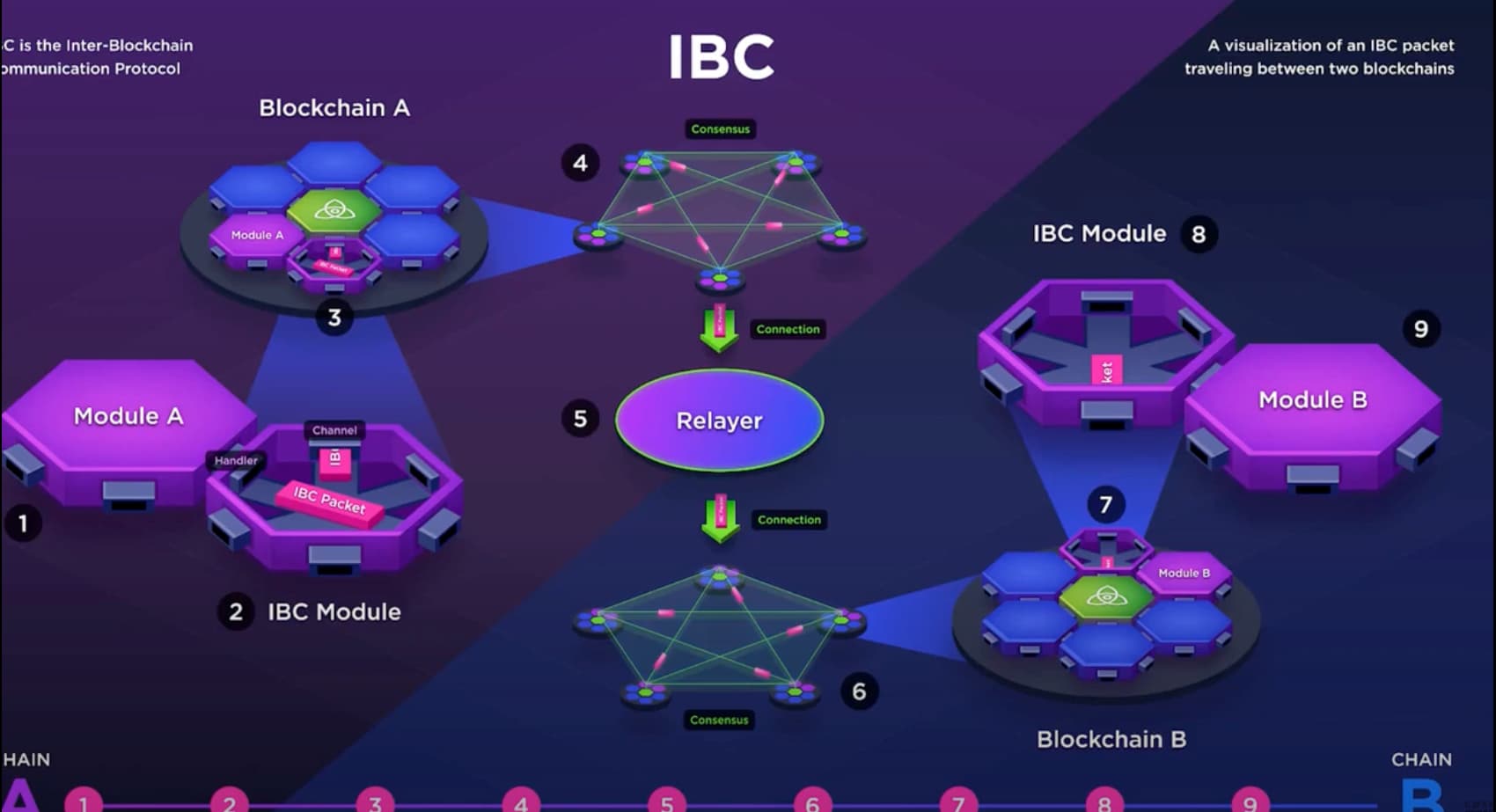
Before initiating a transfer, ensure your source wallet holds enough native tokens to cover gas fees on both the sender and receiver chains. Verify that the IBC channel ID you plan to use is active. A quick check of the relayer logs can confirm it is actively listening for packets.
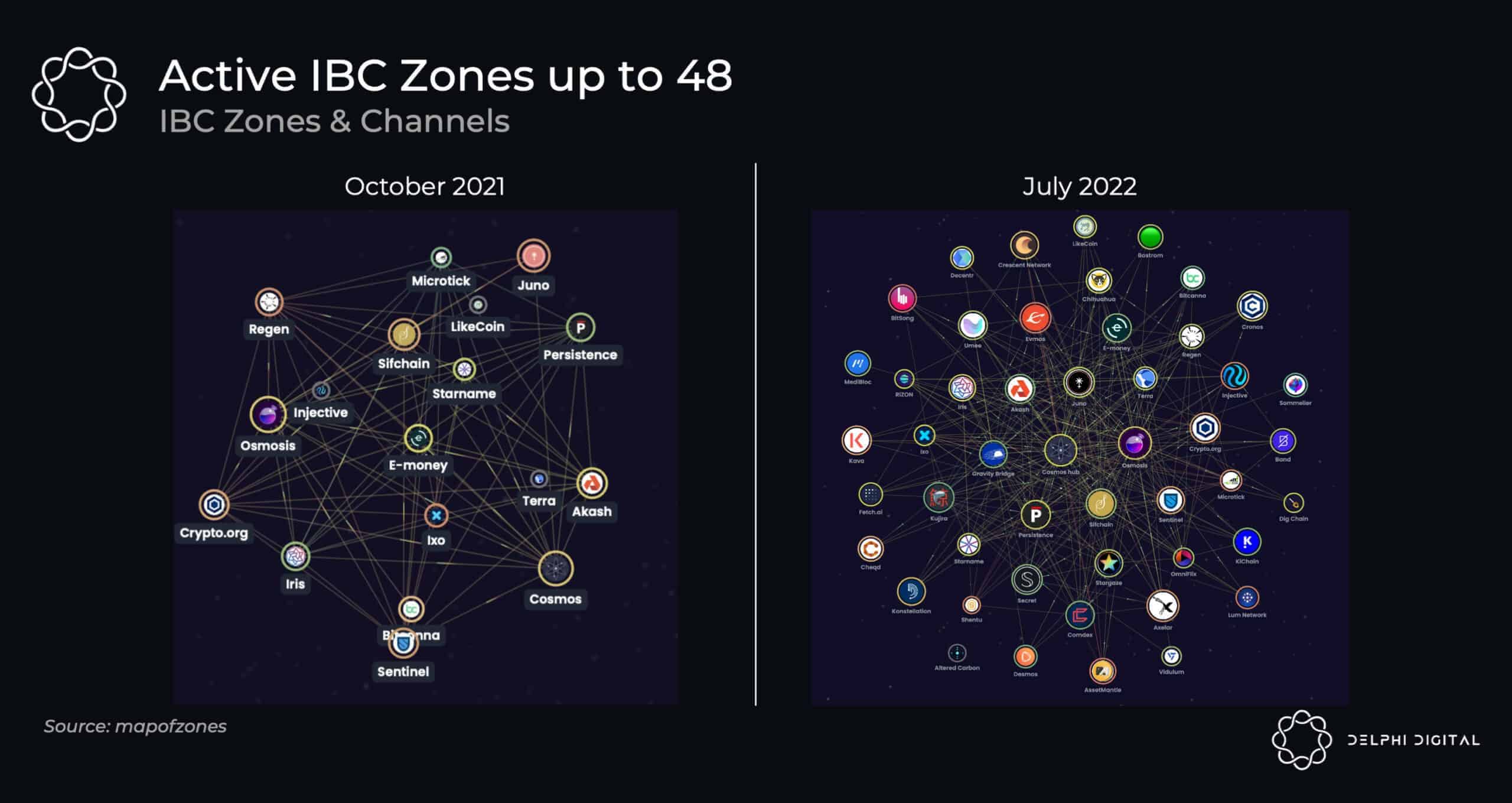
Use your wallet interface (such as Keplr or Cosmos Hub’s official interface) to select the destination chain and the specific IBC channel. Enter the amount of tokens you wish to send. Review the estimated time and fees, then confirm the transaction on the source chain. The relayer will detect this packet shortly after.
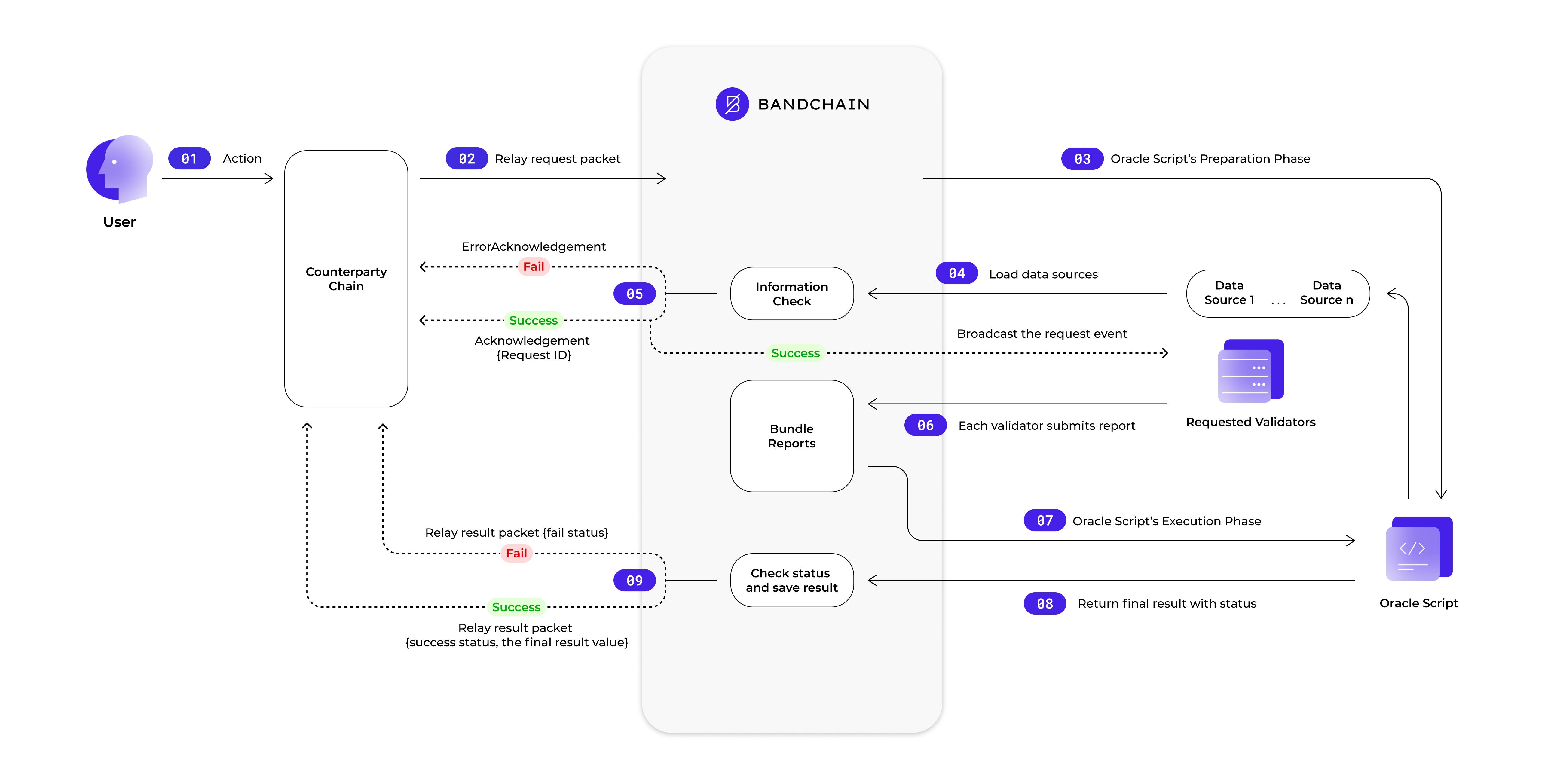
IBC transfers typically take between 3 to 15 minutes, depending on chain congestion and relayer efficiency. Watch your destination wallet for the incoming asset. The tokens will arrive wrapped in the receiving chain’s denomination (e.g., ibc/...). If the transfer stalls, check your relayer’s error logs for dropped packets or light client issues.
Optimize relayer performance
Relayer selection dictates your interchain connectivity speed and cost. In 2026, the choice between self-hosting open-source software or using managed providers hinges on your need for control versus reliability. A relayer scans connected chains, builds packets, and submits proofs to ensure messages cross the IBC bridge.
Managed providers like Crouton or Everstake offer high availability and monitoring out of the box. Self-hosted options like Hermes or Rly give you full access to configuration parameters but require significant DevOps overhead to maintain uptime and handle packet loss.
Use the table below to compare the primary options available for Cosmos IBC relaying in 2026.
| Provider | Type | Cost Model | Control Level | Reliability |
|---|---|---|---|---|
| Hermes | Self-Hosted | Free (Infrastructure only) | Full | Medium (Requires monitoring) |
| Relayer-Layer (Rly) | Self-Hosted | Free (Infrastructure only) | Full | Medium (Requires monitoring) |
| Crouton | Managed | Subscription-based | Low (API/Config only) | High (SLA-backed) |
| Everstake | Managed | Subscription-based | Low (API/Config only) | High (SLA-backed) |
For most teams prioritizing uptime, managed providers reduce the risk of missed packets. If you require low-latency custom logic, self-hosting Hermes remains the standard. The Cosmos IBC ecosystem now connects over 200 public networks, making reliable relaying essential for cross-chain liquidity.
Verify security and finality
Before considering a transfer complete, you must verify that the receiving chain has recorded the packet. The Inter-Blockchain Communication (IBC) protocol relies on light client verification rather than trust assumptions. This means the source chain cryptographically proves that the destination chain processed the transaction, eliminating the need to trust a third-party relayer.
Start by checking the proof of inclusion. A relayer submits a Merkle proof to the source chain, which validates against the light client tracking the destination chain’s state. If the proof matches, the state root is accepted as final. This cryptographic guarantee ensures that funds cannot be double-spent or lost in transit.
To confirm your specific transfer, look for the PacketAcknowledgement event on the source chain. This event signals that the destination chain has successfully processed the packet and sent back an acknowledgment. Once this event is recorded, the tokens are unlocked on the source chain, and the transfer is irreversible.
For a deeper understanding of the underlying verification mechanics, refer to the official IBC-Go Documentation, which details how light clients maintain security across different consensus mechanisms.
Common ibc setup: what to check next
Before deploying your interchain stack, clarify how the Cosmos Hub (ATOM) token functions within the new IBC 2026 infrastructure. The 2026 roadmap introduces IBC Solidity tooling to bridge with EVM chains and plans expansion toward Solana, shifting the focus from isolated chains to a unified interchain network [src-serp-4].
What is the future of Cosmos coin?
The future of ATOM centers on its role as the settlement layer for the Interchain Security model. Rather than relying solely on inflation, ATOM will secure multiple chains through shared security, reducing the need for each chain to maintain its own validator set. This structural shift aims to increase demand for ATOM as a staking asset across the ecosystem.
Why is Cosmos dropping?
Price volatility often stems from the "hub-only" narrative where value accrual was unclear. Critics argued that ATOM holders did not directly benefit from the growth of individual zone chains. The 2026 update addresses this by integrating IBC Solidity, allowing ATOM to secure cross-chain applications, which may stabilize long-term valuation by linking token utility to actual interchain activity.
Is Cosmos a good investment?
Investing in ATOM requires evaluating the success of IBC Solidity adoption. If developers migrate significantly to the Cosmos SDK for EVM compatibility, ATOM’s staking yield could rise due to increased security demand. However, this depends on execution; failure to attract developers to the new tooling could limit growth compared to competing interchain protocols.
How to make money with Cosmos?
Revenue generation now involves staking ATOM to secure IBC-connected chains and participating in governance votes for protocol upgrades. Additionally, providing liquidity to IBC-enabled pools on decentralized exchanges captures trading fees from cross-chain swaps. Always verify the security status of the zone you are interacting with before committing capital.
No comments yet. Be the first to share your thoughts!